Configuration Editor (dugite-config)
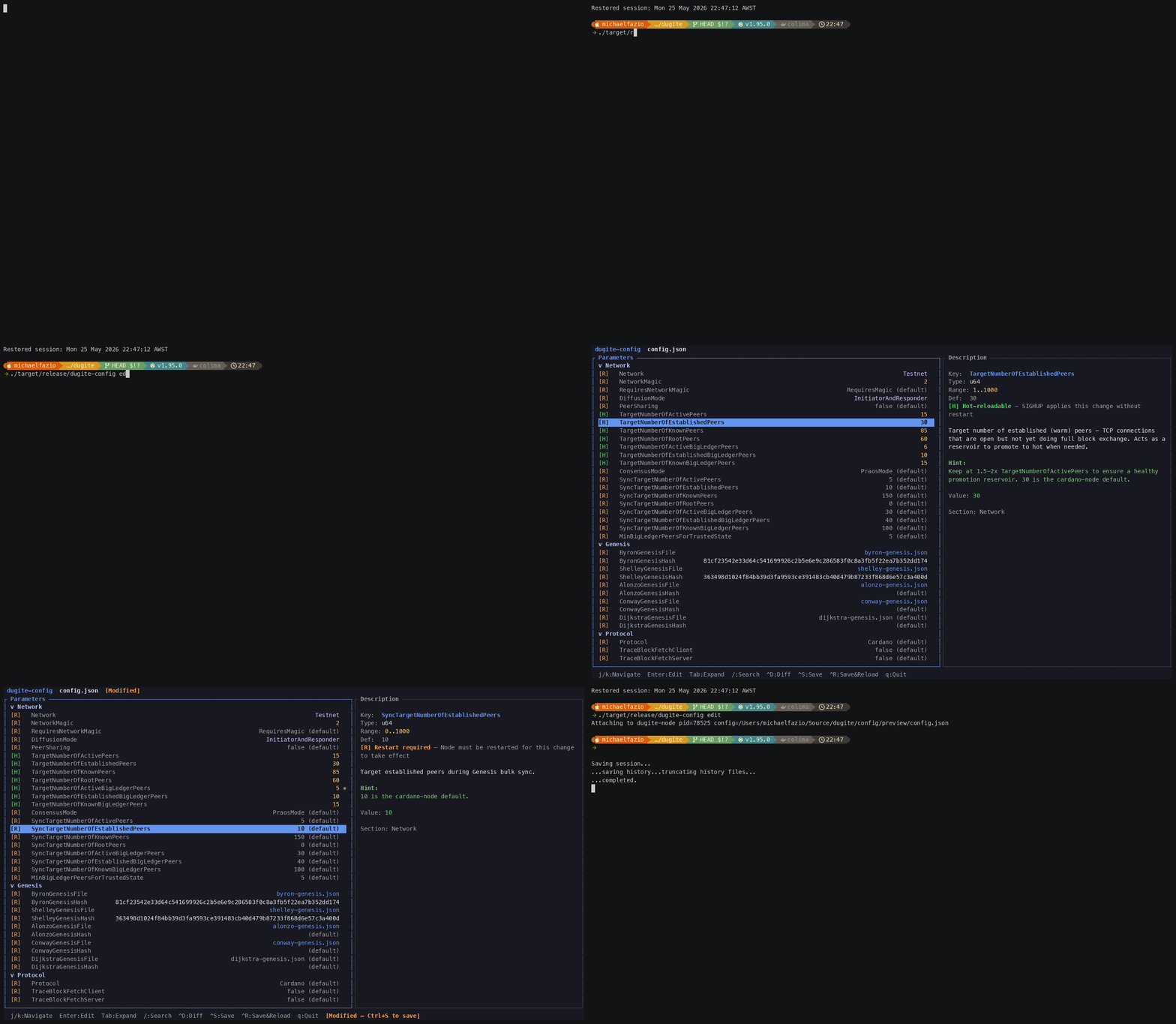
dugite-config is a standalone TUI tool for creating and editing Dugite configuration files interactively. It provides a full-screen terminal interface with tree navigation, inline editing, type validation, and a diff view — no need to remember field names or look up valid ranges.
Installation
dugite-config is built as part of the standard workspace:
cargo build --release -p dugite-config
cp target/release/dugite-config /usr/local/bin/
Commands
| Command | Description |
|---|---|
edit | Launch the full-screen TUI editor, optionally attaching to a running node |
init | Write a default configuration file for a named network |
validate | Validate a configuration file against the parameter schema |
get | Print the value of a single parameter |
set | Set the value of a single parameter non-interactively |
Argument shape:
getandsettake the key (and value) as positional arguments and the file as a--configflag — not the other way round.
edit
# Edit an explicit file
dugite-config edit config/preview/config.json

# Attach to a running node: discovers dugite-node processes on this machine,
# auto-attaches if exactly one is running, otherwise shows a selector
dugite-config edit
| Flag | Description |
|---|---|
<config_file> | Optional positional path. Omit to auto-discover running dugite-node instances |
--node-pid-file <PATH> | File containing the running node's PID, used by Ctrl+R to send SIGHUP. Ignored in discovery mode, where the discovered process's OS PID is used directly. Defaults to ./logs/bp-pair/bp.pid |
In discovery mode the command exits with an error if no dugite-node process is
running, or if the discovered processes have no readable config file.
init
init is not an interactive wizard. It writes a complete default config for
a named network in one shot:
# Write a preview default config
dugite-config init --network preview --out config.json

# Print to stdout instead
dugite-config init --network mainnet
| Flag | Description |
|---|---|
--network, -n | Required. One of mainnet, preview, preprod |
--out, -o | Output path. Prints to stdout when omitted |
validate
Check a configuration file against the schema without modifying it. Exits 0 when valid and 1 when it contains errors, so it drops straight into CI:
dugite-config validate config/preview/config.json
Known keys are validated against their declared type and range. Keys that are
not in the schema are reported as warnings, not errors — this is how a stray
EnableP2P or a typo'd key name gets surfaced, since the node itself ignores
unknown keys silently.
Output on success (written to stderr):
OK — 'config/preview/config.json' is valid (21 parameters, 0 unknown).
Output on failure:
Errors:
  'TargetNumberOfActivePeers': value 200 exceeds maximum (100)
Error: 'config/preview/config.json' failed validation: 1 error(s)
get / set
Non-interactive field access for scripting:
# Get a field
dugite-config get TargetNumberOfActivePeers --config config.json
# Output: 15

# Get with the schema's type, default, section, description, and tuning hint
dugite-config get TargetNumberOfActivePeers --config config.json --verbose

# Set a field (creates config.json.bak first)
dugite-config set TargetNumberOfActivePeers 30 --config config.json
set validates the new value against the schema before writing, and coerces it
to the JSON type the schema declares. A key that is in the schema but absent
from the file is appended; a key in neither is rejected.
Only top-level keys are addressable. There is no dotted-path syntax, so
nested values such as TraceOptions.TraceForge or Rpc.Port must be edited in
the TUI (or by hand).
Interactive Editor
The interactive editor (dugite-config edit) renders a full-screen TUI with two
panels: the parameter tree on the left (60%) and a description panel on the
right (40%). Below 80 columns the right panel is hidden and the tree fills the
terminal.
┌─ Parameters ──────────────────────────────┬─ TargetNumberOfActivePeers ────────┐
│ Network                                   │ Type:    integer (1-100)           │
│   Network                        Testnet  │ Default: 20                        │
│   NetworkMagic                         2  │ Section: Network                   │
│   DiffusionMode      InitiatorAndResponder│                                    │
│   TargetNumberOfActivePeers           15  │ Target number of fully active (hot)│
│   TargetNumberOfEstablishedPeers      30  │ peers. Raising this improves       │
│ Genesis                                   │ propagation at the cost of CPU and │
│   ByronGenesisFile     byron-genesis.json │ bandwidth.                         │
│   ShelleyGenesisFile shelley-genesis.json │                                    │
│ Logging                                   │ Hint: 20 is the cardano-node       │
│   MinSeverity                       Info  │ default. BPs may want 10-15.       │
└───────────────────────────────────────────┴────────────────────────────────────┘
Parameters are grouped into the sections Network, Genesis, Protocol, Logging, Diffusion, Storage, Rpc, and Advanced. Each schema entry also records whether the parameter is hot-reloadable or needs a restart.
Key bindings
| Key | Action |
|---|---|
j / Down | Move cursor down |
k / Up | Move cursor up |
Enter / e | Edit selected parameter — toggles a boolean, cycles an enum, or opens a text buffer for string/number/path |
Tab | Collapse / expand the current section |
/ | Enter search mode (fuzzy filter) |
Esc | Cancel the current edit, close search, or close the diff overlay |
Ctrl+D | Toggle the diff overlay (original vs. current) |
Ctrl+S | Save to disk — does not exit |
Ctrl+R | Save and send SIGHUP to the running node (live reload) |
q | Quit, prompting if there are unsaved changes |
Note that Ctrl+S saves and stays in the editor; use q to leave. There is no
Ctrl+Q binding and no ? help overlay.
Inline editing
Pressing Enter on a field acts according to the field's type: booleans toggle
immediately, enums cycle to the next choice, and string/number/path fields open
a text buffer. In the text buffer, Enter confirms and Escape cancels.
Validation runs on confirmation against the schema's declared type and range.
Saving
Every save — from Ctrl+S, Ctrl+R, or the set subcommand — first copies the
original file to <path>.bak. Only one level of backup is kept; the previous
.bak is overwritten. Files are written with 4-space indentation and a trailing
newline, matching the official Cardano config files.
Parameters that are absent from the file are shown in the tree seeded from their schema default, and are only written out if you actually change them — so saving does not balloon a minimal config into a fully-pinned one.
Live reload (Ctrl+R)
Ctrl+R saves and then sends SIGHUP to the running node, applying the
hot-reloadable subset of the config without a restart. If the PID cannot be
resolved the config is still saved and the signal is skipped with an error
message. See Live Reload for which
fields actually take effect live.
Search and filter
Press / to enter search mode, which fuzzy-filters the tree as you type.
Backspace deletes, Enter confirms and returns to browse mode with the cursor
on the first match, and Escape clears the filter. Note that j and k move
the cursor while in search mode rather than being typed into the query.
Diff overlay
Ctrl+D opens an overlay comparing the on-disk original against your pending
changes. While the overlay is showing, only Esc is accepted — it closes the
overlay.
Scripted workflows
dugite-config can be used in deployment scripts for automated configuration
management:
#!/usr/bin/env bash
# Example: configure a relay node for preview testnet
set -euo pipefail

CONFIG="config/preview/config.json"

dugite-config init --network preview --out "$CONFIG"

dugite-config set DiffusionMode InitiatorAndResponder --config "$CONFIG"
dugite-config set TargetNumberOfActivePeers 15        --config "$CONFIG"
dugite-config set TargetNumberOfEstablishedPeers 30   --config "$CONFIG"
dugite-config set TargetNumberOfKnownPeers 85         --config "$CONFIG"

dugite-config validate "$CONFIG"