Monitoring
Dugite provides two complementary monitoring tools: a terminal dashboard (dugite-monitor) for quick at-a-glance status, and a Prometheus-compatible metrics endpoint for production alerting and dashboards.
Terminal Dashboard (dugite-monitor)
dugite-monitor is a standalone binary that renders a real-time status dashboard in the terminal by polling the node's Prometheus endpoint. It requires no external infrastructure and works over SSH.
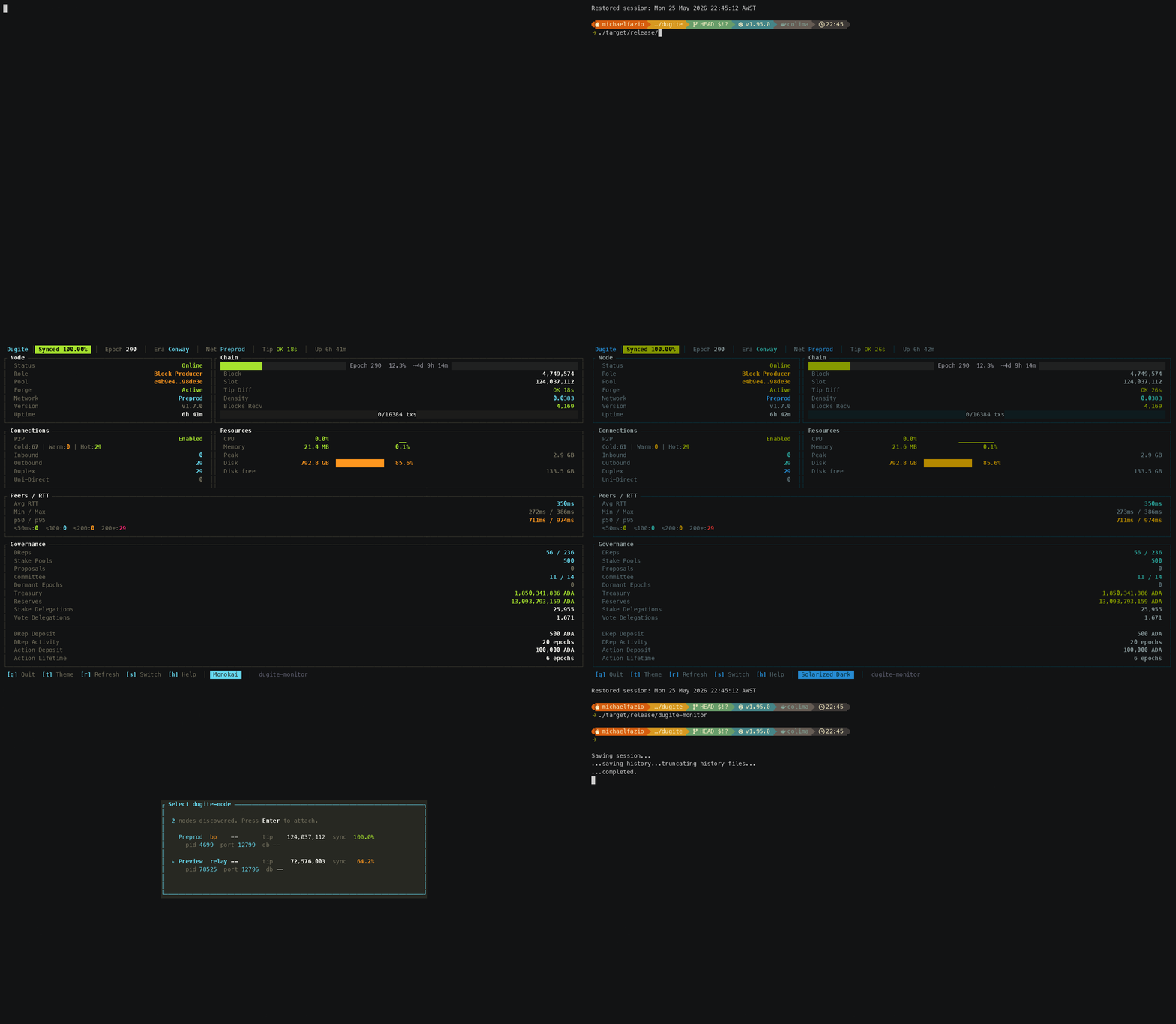
# Auto-discover a running dugite-node and attach
dugite-monitor

# Monitor a specific endpoint (skips discovery)
dugite-monitor --metrics-url http://192.168.1.100:12796/metrics

# Pin the epoch length instead of auto-detecting it from dugite_network_magic
dugite-monitor --network-magic 2

# Show disk usage for the node's database volume in the Resources panel
dugite-monitor --db-path ./db-preview
When --metrics-url is omitted, dugite-monitor enumerates running dugite-node processes (via sysinfo + netstat2) and probes their /metrics endpoints. One node found: it attaches silently. Multiple: a selection dialog appears. None: it falls back to http://localhost:12798/metrics.
Careful: that fallback (12798) is not the node's default metrics port (12796 — see Which port? below). The fallback only matters when discovery finds nothing, in which case there is usually no node to monitor anyway. If the monitor reports no data, pass
--metrics-urlexplicitly with the port your config actually pins.
The dashboard displays five panels:
- Node — role, network, version, era, uptime
- Chain — epoch progress bar, block/slot/tip metrics, density, forks, tx counts
- Connections — P2P state, inbound/outbound, cold/warm/hot, uni/bi/duplex counts
- Resources — CPU %, live memory, RSS memory (plus disk when
--db-pathis set) - Peers — RTT bands (0-50 ms, 50-100 ms, 100-200 ms, 200 ms+), min/avg/max RTT
Metrics are polled once per second. The interval is a compile-time constant — there is no flag to change it.
| Key | Action |
|---|---|
q / Esc | Quit |
t | Cycle theme |
r | Force-refresh metrics |
s | Switch to a different node |
h / ? | Toggle help overlay |
Prometheus Metrics Endpoint
Dugite exposes a Prometheus-compatible metrics endpoint for monitoring node health and sync progress.
Metrics Endpoint
The metrics server responds to any unrecognised HTTP path with Prometheus exposition format metrics:
http://localhost:12796/metrics
Which port?
The built-in fallback is 12796, deliberately offset from cardano-node's 12798 so a dugite node and a Haskell node can co-exist on one host. The shipped per-network configs each pin a port explicitly, so in practice the port comes from the config file:
| Config | MetricsPort |
|---|---|
config/preview/config.json | 12796 |
config/preprod/config.json | 12799 |
config/mainnet/config.json | 12800 |
| (field absent) | 12796 |
Resolution order, highest priority first:
--no-metrics→ server disabled.--metrics-port <PORT>→ explicit operator override (wins even overTurnOnLogMetrics=false).TurnOnLogMetrics: falsein the config JSON → server disabled (master off-switch, matching cardano-node).MetricsPortin the config JSON.- Built-in default 12796.
Pass --require-metrics to make a bind failure a fatal startup error instead of a logged warning.
The examples below use 12796. Substitute your network's port from the table above.
Example response:
# HELP dugite_blocks_received_total Total blocks received from peers
# TYPE dugite_blocks_received_total counter
dugite_blocks_received_total 1523847

# HELP dugite_blocks_applied_total Total blocks applied to ledger
# TYPE dugite_blocks_applied_total counter
dugite_blocks_applied_total 1523845

# HELP dugite_slot_number Current slot number
# TYPE dugite_slot_number gauge
dugite_slot_number 142857392

# HELP dugite_block_number Current block number
# TYPE dugite_block_number gauge
dugite_block_number 11283746

# HELP dugite_epoch_number Current epoch number
# TYPE dugite_epoch_number gauge
dugite_epoch_number 512

# HELP dugite_sync_progress_percent Chain sync progress (0-10000, divide by 100 for %)
# TYPE dugite_sync_progress_percent gauge
dugite_sync_progress_percent 9542

# HELP dugite_utxo_count Number of entries in the UTxO set
# TYPE dugite_utxo_count gauge
dugite_utxo_count 15234892

# HELP dugite_mempool_tx_count Number of transactions in the mempool
# TYPE dugite_mempool_tx_count gauge
dugite_mempool_tx_count 42

# HELP dugite_peers_connected Number of connected peers
# TYPE dugite_peers_connected gauge
dugite_peers_connected 8
Health Endpoint
The metrics server exposes a /health endpoint for monitoring node status:
GET http://localhost:12796/health
Always returns 200 OK. The status field carries the verdict:
- healthy — sync progress >= 99.9%
- syncing — actively catching up to chain tip
- stalled — no blocks received for > 5 minutes AND sync < 99%
{
  "status": "healthy",
  "uptime_seconds": 3421,
  "slot_number": 142857392,
  "block_number": 11283746,
  "epoch_number": 512,
  "sync_progress": 99.95,
  "peers_connected": 8,
  "last_block_received_at": "2026-03-14T12:34:56.789Z"
}
last_block_received_at is null until the first block arrives.
Readiness Endpoint
For Kubernetes readiness probes:
GET http://localhost:12796/ready
Returns 200 OK when sync_progress >= 99.9%, 503 Service Unavailable otherwise:
{"ready": true}
or:
{"ready": false, "sync_progress": 75.42}
Liveness Endpoint
For Kubernetes liveness probes — this is the one that should restart a wedged pod:
GET http://localhost:12796/live
Returns 200 OK when a block has been applied within --liveness-threshold-secs (default 600), or when no block has arrived yet but the node has been up for less than that window (warm-up grace). Otherwise 503:
{"alive": true, "threshold_secs": 600}
{"alive": false, "threshold_secs": 600, "last_block_received_at": "2026-03-14T12:34:56.789Z"}
Set --liveness-threshold-secs 0 to make /live always return 200.
/readytracks sync progress;/livetracks forward progress. A node that is 40% synced but applying blocks is correctly not-ready and alive. Wiring a liveness probe to/readywill restart-loop a node that is merely still syncing.
EKG Compatibility Endpoint
GET http://localhost:12796/ekg
Returns the nested-object JSON layout that cardano-node's EKG (System.Remote.Monitoring) exposes, so legacy gLiveView / CNTools dashboards that poll port 12788 can be pointed at dugite unmodified.
Available Metrics
Counters
| Metric | Description |
|---|---|
dugite_blocks_received_total | Total blocks received from peers |
dugite_blocks_applied_total | Total blocks successfully applied to the ledger |
dugite_transactions_received_total | Total transactions received |
dugite_transactions_validated_total | Total transactions validated |
dugite_transactions_rejected_total | Total transactions rejected |
dugite_rollback_count_total | Total number of chain rollbacks |
dugite_block_apply_failures_total | Blocks that failed to apply to the ledger |
dugite_fetched_blocks_not_connecting_total | Fetched blocks that did not connect to the current chain |
dugite_header_full_validations_total | Headers that went through full crypto validation |
dugite_header_validation_failures_total | Headers that failed validation |
dugite_blocks_forged_total | Total blocks forged by this node |
dugite_leader_checks_total | Total VRF leader checks performed |
dugite_leader_checks_not_elected_total | Leader checks where node was not elected |
dugite_forge_failures_total | Block forge attempts that failed |
dugite_blocks_announced_total | Blocks successfully announced to peers |
dugite_forge_race_lost_total | Forged blocks that lost the race to another pool |
dugite_forge_slot_battles_total | Slot battles entered |
dugite_forge_announce_no_subscribers_total | Forged blocks with no peer to announce to |
dugite_n2n_connections_total | Total N2N (peer-to-peer) connections accepted |
dugite_n2c_connections_total | Total N2C (client) connections accepted |
dugite_apply_mode_reapply_total | Blocks applied in trust-consensus reapply mode |
dugite_apply_mode_validate_all_total | Blocks applied with full validation |
dugite_blockfetch_rx_bytes_total | Bytes received over BlockFetch |
dugite_blockfetch_busy_us_total | Microseconds BlockFetch spent busy |
dugite_blockfetch_send_blocked_us_total | Microseconds BlockFetch stalled on send |
dugite_blockfetch_idle_no_headers_total | BlockFetch idle periods caused by header starvation |
dugite_snapshot_enqueued_total | Ledger snapshots enqueued |
dugite_snapshot_skipped_busy_total | Snapshots skipped because the worker was busy |
dugite_snapshot_failed_total | Snapshot attempts that failed |
dugite_utxo_flush_failed_total | UTxO store flush failures |
dugite_validation_errors_total{error="..."} | Transaction validation errors, broken down by error type |
dugite_protocol_errors_total{error="..."} | Protocol-level errors by type (e.g. handshake failures, connection errors) |
dugite_config_reload_total{result="..."} | SIGHUP-triggered config reloads by result |
Gauges
Chain and sync
| Metric | Description |
|---|---|
dugite_sync_progress_percent | Chain sync progress (0-10000; divide by 100 for percentage) |
dugite_slot_number | Current slot number |
dugite_block_number | Current block number |
dugite_epoch_number | Current epoch number |
dugite_slot_in_epoch | Offset of the current slot within the epoch (era-aware) |
dugite_epoch_length | Slots per epoch for the current epoch (era-aware) |
dugite_slot_length_ms | Slot duration in ms from the active Shelley genesis |
dugite_active_slots_coeff_x1000 | Praos f scaled by 1000 (200 = f=0.20) |
dugite_era | Ledger era index: 0=Byron, 1=Shelley, 2=Allegra, 3=Mary, 4=Alonzo, 5=Babbage, 6=Conway, 7=Dijkstra |
dugite_protocol_major_version / dugite_protocol_minor_version | Active protocol version |
dugite_network_magic | 764824073=mainnet, 2=preview, 1=preprod |
dugite_tip_age_seconds | Seconds since the tip slot time |
dugite_chainsync_idle_seconds | Seconds since last ChainSync RollForward event |
dugite_max_peer_tip_slot | Highest tip slot advertised by any peer |
dugite_ledger_replay_duration_seconds | Duration of last ledger replay in seconds |
dugite_gsm_state | Genesis State Machine state: 0=PreSyncing, 1=Syncing, 2=CaughtUp |
dugite_consensus_mode | 0=Praos, 1=Ouroboros Genesis |
dugite_loe_tip_slot | Limit on Eagerness tip slot published to chain selection |
dugite_utxo_count | Number of entries in the UTxO set |
Peers and connections
| Metric | Description |
|---|---|
dugite_peers_connected | Number of connected peers |
dugite_peers_cold | Number of cold (known but unconnected) peers |
dugite_peers_warm | Number of warm (connected, not syncing) peers |
dugite_peers_hot | Number of hot (actively syncing) peers |
dugite_peers_inbound / dugite_peers_outbound / dugite_peers_duplex | Peers by connection direction |
dugite_conn_inbound / dugite_conn_outbound / dugite_conn_duplex / dugite_conn_full_duplex / dugite_conn_unidirectional / dugite_conn_terminating | Connection-manager state counts |
dugite_n2n_connections_active | Currently active N2N connections |
dugite_n2c_connections_active | Currently active N2C connections |
dugite_diffusion_mode | 0 = InitiatorAndResponder, 1 = InitiatorOnly |
dugite_peer_sharing_enabled | Whether peer sharing is active (0 or 1) |
dugite_blockfetch_active_peers | Peers currently serving BlockFetch |
dugite_gdd_disconnects_total | Genesis Density Disconnector peer disconnects |
dugite_csj_dynamos / dugite_csj_objectors / dugite_csj_jumpers / dugite_csj_disengaged | ChainSync Jumping peer roles |
dugite_peer_rtt_avg_ms / _min_ms / _max_ms / _samples | EWMA peer RTT summary |
dugite_peer_rtt_band_0_50 / _50_100 / _100_200 / _200_plus | Connected peers bucketed by EWMA RTT |
dugite_peer_governor_target{name="..."} | Peer governor target counts by name |
Mempool and transactions
| Metric | Description |
|---|---|
dugite_mempool_tx_count | Number of transactions in the mempool |
dugite_mempool_tx_max | Maximum transaction capacity of the mempool |
dugite_mempool_bytes | Size of the mempool in bytes |
dugite_n2c_txs_submitted_total / _accepted_total / _rejected_total | N2C local tx-submission outcomes |
Ledger and governance
| Metric | Description |
|---|---|
dugite_delegation_count | Number of active stake delegations |
dugite_vote_delegation_count | Number of vote delegations |
dugite_treasury_lovelace | Total lovelace in the treasury |
dugite_reserves_lovelace | Total lovelace remaining in the reserves pot |
dugite_drep_count | Registered DReps (active + inactive) |
dugite_drep_active | DReps still within their activity window |
dugite_proposal_count | Number of active governance proposals |
dugite_pool_count | Number of registered stake pools |
dugite_committee_total_count / _hot_count / _resigned_count | Constitutional Committee membership |
dugite_committee_threshold_bps | CC threshold in basis points |
dugite_committee_no_confidence | 1 when the committee is in a no-confidence state |
dugite_constitution_present | 1 when a constitution is set |
dugite_gov_dormant_epochs | Consecutive epochs with no governance activity |
dugite_pparam_drep_deposit_lovelace, dugite_pparam_drep_activity_epochs, dugite_pparam_gov_action_deposit_lovelace, dugite_pparam_gov_action_lifetime_epochs, dugite_pparam_committee_min_size, dugite_pparam_committee_max_term_length | Conway governance protocol parameters |
Process and host
| Metric | Description |
|---|---|
dugite_uptime_seconds | Seconds since node startup |
dugite_is_block_producer | 1 when forge credentials are loaded, 0 for relay |
dugite_disk_available_bytes / dugite_disk_used_bytes / dugite_disk_total_bytes | Database volume disk usage |
dugite_mem_resident_bytes | Resident set size (RSS) in bytes |
dugite_mem_peak_bytes | Peak RSS in bytes |
dugite_mem_total_bytes | Total physical memory on the host |
dugite_cpu_percent | Process CPU utilisation as a percentage of one core |
dugite_cpu_seconds_total | Cumulative process CPU time in seconds |
dugite_snapshot_worker_alive | 1 when the background snapshot worker is running |
dugite_utxo_backend_info{backend="..."} | Active UTxO storage backend |
dugite_pool_id_info{pool_id="..."} | Block producer pool identity (block producers only) |
Histograms
| Metric | Buckets (ms) | Description |
|---|---|---|
dugite_peer_handshake_rtt_ms | 1, 5, 10, 25, 50, 100, 250, 500, 1000, 2500, 5000, 10000 | Peer N2N handshake round-trip time |
dugite_peer_block_fetch_range_ms | (same) | BlockFetch range request latency |
Histograms expose _bucket, _count, and _sum suffixes for standard Prometheus histogram queries.
Note: the block-fetch histogram is named
dugite_peer_block_fetch_range_ms, notdugite_peer_block_fetch_ms. The bundled Grafana dashboard still queries the old name — see the caveat under Grafana Dashboard.
Prometheus Configuration
Add the Dugite node as a scrape target in your prometheus.yml:
scrape_configs:
  - job_name: 'dugite'
    scrape_interval: 15s
    static_configs:
      - targets: ['localhost:12800']    # mainnet; see the port table above
        labels:
          network: 'mainnet'
          node: 'relay-1'
A ready-made config is committed at config/monitoring/prometheus.yml. It scrapes every well-known dugite port so the dashboard works regardless of which just run-{bp,relay} <network> recipe is active — down targets simply show as DOWN in /targets:
| Port | Role |
|---|---|
| 12796 | preview relay (also the built-in default) |
| 12797 | preview BP |
| 12798 | cardano-node default |
| 12799 | preprod |
| 12800 | mainnet |
Alert rules live alongside it in config/monitoring/prometheus-alerts.yml, covering forge failures, rollback rate, tip age, hot-peer starvation, and RSS growth.
Grafana Dashboard
Dugite ships with a pre-built Grafana dashboard at config/monitoring/grafana-dashboard.json. The dashboard covers all node metrics organized into nine sections:
- Overview — Sync progress gauge, block height, epoch, slot, connected peers, blocks forged
- Node Health — Uptime, disk available (stat + time series)
- Sync & Throughput — Sync progress over time, block apply/receive rate (blk/s), block height, rollbacks
- Peers — Connected peer count over time, peer state breakdown (hot/warm/cold stacked)
- Mempool & Transactions — Mempool tx count, mempool size (bytes), transaction rate (received/validated/rejected)
- Ledger State — UTxO set size, stake delegations, treasury balance (ADA), registered stake pools
- Governance — Registered DReps, active governance proposals
- Block Production — Total blocks forged, block forge rate (blk/h)
- Network Latency — Handshake RTT and block fetch latency percentiles (p50/p95/p99), request counts
- Validation Errors — Error breakdown by type (stacked bars), error totals (bar chart)
Known stale panel: the block-fetch latency panels query
dugite_peer_block_fetch_ms_bucket, but the node emitsdugite_peer_block_fetch_range_ms_bucket. Those panels render empty until the dashboard JSON is updated. Every other metric referenced by the dashboard matches a metric the node actually emits.
Quick Start (Docker)
The fastest way to start a local monitoring stack is with the included script:
# Start Prometheus + Grafana
just monitor-start         # or: ./scripts/monitoring/start.sh

# Open the dashboard (admin/admin)
open http://localhost:3000/d/dugite-node/dugite-node

# Check status
just monitor-status        # or: ./scripts/monitoring/start.sh status

# Stop
just monitor-stop          # or: ./scripts/monitoring/start.sh stop
The script starts Prometheus (port 9090) and Grafana (port 3000) as Docker containers, auto-configures the Prometheus datasource, and imports the Dugite dashboard. Prometheus data is persisted in .monitoring-data/ so metrics survive restarts.
Environment variables for port customization:
| Variable | Default | Description |
|---|---|---|
PROMETHEUS_PORT | 9090 | Prometheus web UI port |
GRAFANA_PORT | 3000 | Grafana web UI port |
DUGITE_METRICS_PORT | 12798 | Port where Dugite exposes metrics |
Importing the Dashboard
- Open Grafana and go to Dashboards > Import
- Click Upload JSON file and select
config/monitoring/grafana-dashboard.json - Select your Prometheus data source when prompted
- Click Import
The dashboard includes an instance template variable so you can monitor multiple Dugite nodes (relays + block producer) from a single dashboard. It auto-refreshes every 30 seconds.
Provisioning
To auto-provision the dashboard, copy it into your Grafana provisioning directory:
cp config/monitoring/grafana-dashboard.json /etc/grafana/provisioning/dashboards/dugite.json
Add a dashboard provider in /etc/grafana/provisioning/dashboards/dugite.yaml:
apiVersion: 1
providers:
  - name: Dugite
    folder: Cardano
    type: file
    options:
      path: /etc/grafana/provisioning/dashboards
      foldersFromFilesStructure: false
Quick Start (macOS)
To quickly preview the dashboard locally with Homebrew:
# Install Prometheus and Grafana
brew install prometheus grafana

# Configure Prometheus to scrape Dugite
cat > /opt/homebrew/etc/prometheus.yml << 'EOF'
global:
  scrape_interval: 5s

scrape_configs:
  - job_name: dugite
    static_configs:
      - targets: ['localhost:12796']    # match your config's MetricsPort
EOF

# Provision the datasource
cat > "$(brew --prefix)/opt/grafana/share/grafana/conf/provisioning/datasources/dugite.yaml" << 'EOF'
apiVersion: 1
datasources:
  - name: Prometheus
    type: prometheus
    access: proxy
    url: http://localhost:9090
    isDefault: true
    uid: DS_PROMETHEUS
EOF

# Provision the dashboard
cat > "$(brew --prefix)/opt/grafana/share/grafana/conf/provisioning/dashboards/dugite.yaml" << 'EOF'
apiVersion: 1
providers:
  - name: Dugite
    folder: Cardano
    type: file
    options:
      path: /opt/homebrew/var/lib/grafana/dashboards
EOF

mkdir -p /opt/homebrew/var/lib/grafana/dashboards
sed 's/${DS_PROMETHEUS}/DS_PROMETHEUS/g' config/monitoring/grafana-dashboard.json \
  > /opt/homebrew/var/lib/grafana/dashboards/dugite.json

# Start services
brew services start prometheus
brew services start grafana

# Open the dashboard (default login: admin/admin)
open "http://localhost:3000/d/dugite-node/dugite-node"
To stop:
brew services stop prometheus grafana
Key Queries
| Panel | PromQL |
|---|---|
| Sync progress | dugite_sync_progress_percent / 100 |
| Block throughput | rate(dugite_blocks_applied_total[5m]) |
| Transaction rejection rate | rate(dugite_transactions_rejected_total[5m]) |
| Treasury balance (ADA) | dugite_treasury_lovelace / 1e6 |
| Block forge rate (per hour) | rate(dugite_blocks_forged_total[1h]) * 3600 |
| Handshake RTT p95 | histogram_quantile(0.95, rate(dugite_peer_handshake_rtt_ms_bucket[5m])) |
| Block fetch latency p95 | histogram_quantile(0.95, rate(dugite_peer_block_fetch_range_ms_bucket[5m])) |
| Validation errors by type | rate(dugite_validation_errors_total[5m]) |
| Protocol errors by type | rate(dugite_protocol_errors_total[5m]) |
| Leader election rate | rate(dugite_leader_checks_total[5m]) |
| Active N2N connections | dugite_n2n_connections_active |
| Disk available | dugite_disk_available_bytes |
Console Logging
In addition to the Prometheus endpoint, Dugite logs sync progress to the console every 5 seconds — but only while catching up. Once the node is following the tip (remaining would be 0) the line stops being emitted, so silence here means "synced", not "stalled". The fields are:
| Field | Meaning |
|---|---|
progress | Sync percentage |
epoch | Current epoch number |
block | Current block number |
tip | Best known tip block number |
remaining | Blocks left to apply |
speed | Blocks-per-second throughput |
utxos | UTxO set size |
Example log line:
2026-03-12T12:34:56.789Z INFO dugite_node::node: Syncing progress="95.42%" epoch=512 block=11283746 tip=11300000 remaining=16254 speed="312 blk/s" utxos=15234892
Log output can be directed to stdout, file, or systemd journal. See Logging for full details on output targets, file rotation, and log level configuration.